
Integration Effort & Timeline
Endemic+ is designed to be lightweight. The SDK integration is small, the platform setup is self-service, and most studios are live within a day.
Last update
May 7, 2026
At a Glance
Here's what a typical Endemic+ integration looks like for a studio.
<1 day
Typical Integration Time
From SDK install to seeing your first test placement in-game.
~100
Lines of Code
Most integrations require minimal code. The SDK handles the heavy lifting.
0
Backend Work Required
No server-side setup. The SDK communicates with the Endemic+ platform directly.
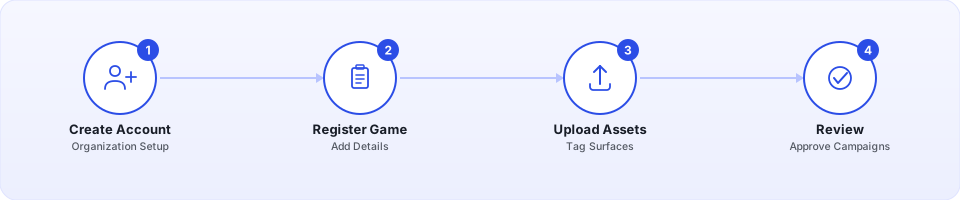
What You Do on the Platform
The Endemic+ platform is where you manage your game, placements, and campaigns. Setup is self-service and takes minutes.
- 1
Create your account
Sign up, create your organization, and invite team members if needed.
- 2
Register your game
Add your game with basic information — title, platform, genre, and a description.
- 3
Upload your placements
Upload textures or screenshots of the in-game surfaces you want to make available for brand placements. Tag each with its type (2D image, animation, or 3D object).
- 4
Review and approve campaigns
When an advertiser proposes a campaign for your game, you review the creatives and approve or request changes directly on the platform.
What You Do in Your Game
The in-game integration involves installing the SDK, authenticating, and linking your registered placements to GameObjects or scene elements.
- 1
Install the SDK
Add the Endemic+ package to your project using our integration guides.
- 2
Authenticate
Login in to your Endemic+ account and link your game to the Endemic+ platform.
- 3
Link placements to scene elements
Tag each registered placement to the corresponding visual element in your game.
- 4
Test in preview mode
Run your game locally with the SDK in preview mode to verify placements look correct before going live.
No server-side code
- The SDK communicates directly with the Endemic+ platform — you don't need to set up any backend infrastructure, APIs, or databases.
- All configuration is managed through the platform dashboard and pulled by the SDK at runtime.
What's Handled for You
Once the integration is in place, the platform and SDK take care of the rest.
Creative Delivery
The SDK fetches active campaign creatives at runtime and applies them to your linked placements automatically. No manual texture swaps or content updates needed.
Measurement & Telemetry
Viewability tracking, impression counting, and session data are collected by the SDK and reported on the platform — no additional instrumentation required.
Campaign Lifecycle
Campaign start/end dates, creative rotation, and fallback behavior are all managed by the platform. Your game just needs the SDK running.
Typical Timeline
Here's what a realistic integration timeline looks like for most studios.
Day 1 — Setup & Integration
Most of the work happens here.
- Create your account and register your game on the platform
- Upload your in-game placements
- Install the SDK and authenticate
- Link placements to scene elements and test in preview mode
By end of day, you should see test placements rendering in your game.
Ongoing — Campaigns & Maintenance
After the initial setup, ongoing work is minimal.
- Review and approve campaign creatives as they come in
- Add new placements when you update your game with new surfaces
- Update the SDK when new versions are released (optional but recommended)
Now the only part you have to worry about is the approval process.